Photo by Roni Bintang/Getty Images
Americans reportedly send six billion text messages per day, with 81% of U.S. users relying on the built-in messages app on their phones instead of alternatives like Telegram and WhatsApp. If you’re still sending SMS messages, though, you could be leaving yourself open to unwanted threats and security risks. Here’s how and why you should enable RCS messaging on your phone right now.
RCS, short for Rich Communication Services, is the new gold standard text messaging platform that has officially replaced SMS and MMS. It was created all the way back in 2008 by the Global System for Mobile Communications Association, a unified organization consisting of popular cell service providers, including AT&T and T-Mobile, among many others.
RCS didn’t receive broad appeal, however, until Google purchased a company called Jibe Mobile in 2015, which specialized in RCS technology. Google went on to integrate RCS directly into the Google Messages app on Android by 2020, making it the premiere messaging service on Samsung Galaxy phones, Google Pixel devices, and more.
After years of pressure from Google, Apple finally adopted RCS into iPhone in 2023, replacing SMS as the fallback option while maintaining iMessage as its proprietary messaging service.
RCS is meant to unify the text messaging experience across iPhone and Android.
It’s important to note that SMS and MMS are still supported on most devices today, but they’re not nearly as secure, capable, or reliable.
RCS is meant to unify the text messaging experience across iPhone and Android. While iPhone users who text other iPhones will still default to iMessage, Android users who text other Android devices or iPhones will send messages through RCS. These new RCS-style messages come with several benefits that will be very familiar to iMessage users on iPhone while making texts better for Android users overall.
While RCS is safer, more private, and simply better than SMS, the service’s ability to send hi-res imagery makes it easier for scammers to send spam messages to a broader group of people. In fact, the emergence of RCS is partly responsible for the growing degree of spam texts in the U.S.
That shouldn’t deter you from switching to it, though. The benefits of RCS far outweigh its deterrents. It’s also the future of text messaging standards, meaning it will be supported and receive security updates for the long haul, far beyond SMS and MMS.
If you receive too many spam text messages while using RCS, check out our anti-spam text guide. This will banish scammers from your messages app for good.
It’s fairly easy to enable RCS on both iPhones and Android devices. Before you go looking for these settings, though, note that RCS activation is contingent on your carrier allowing RCS onto its network. Some carriers have been slower than others to enable the service, so if it’s not available on your device yet, it will be in the future. Most carriers are on board, though, so you probably won’t have any trouble.
RELATED: Amazon's Ring is running a spy ring from your home. Here's how to turn it off.
 Photo by Joe Raedle/Getty Images
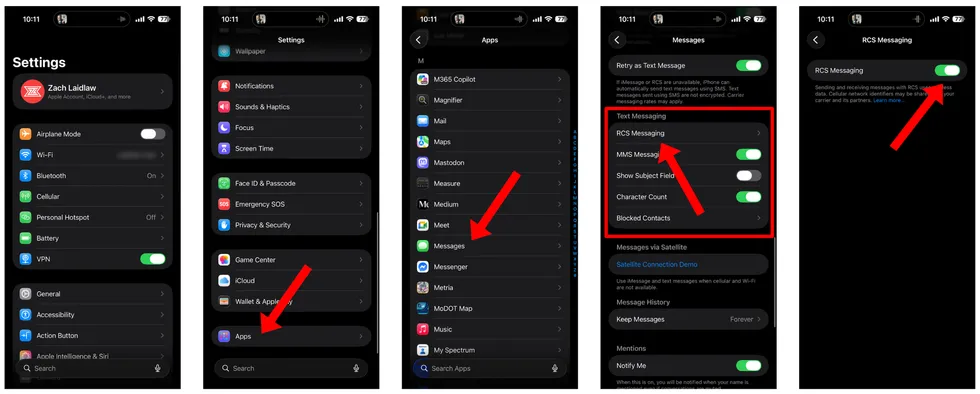
To enable RCS on iPhone, open the Settings app. Scroll to the bottom and tap “Apps.” Then scroll to the middle of the page and tap into “Messages.” Near the lower half of the screen in the “Text Messaging” section, you’ll find “RCS Messaging.” Tap on that, toggle RCS Messaging on, and you’re done!
 Screenshots by Zach Laidlaw
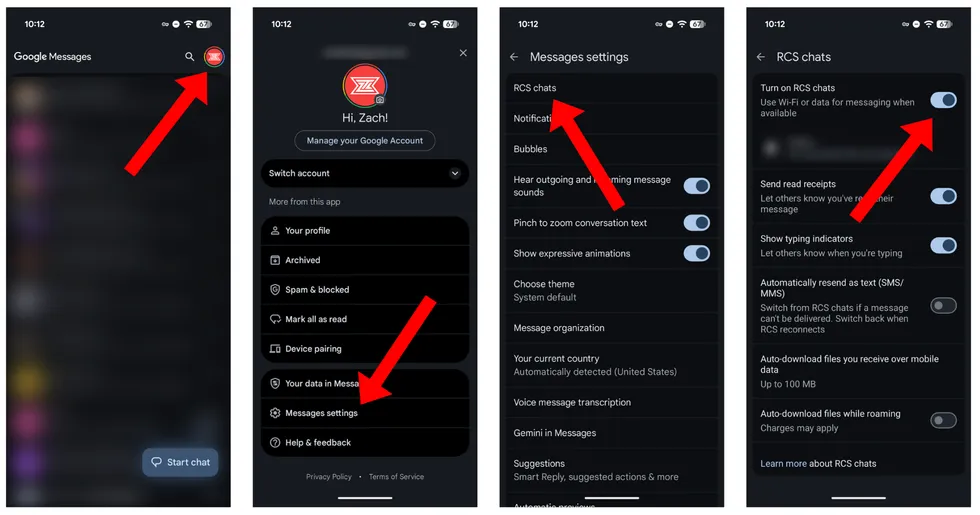
To enable RCS on Android, you’ll first need the official Google Messages app. At the time this article was published, Google Messages is the only messaging app on Android that fully supports RCS’ full list of features, including end-to-end encryption. Inside Google Messages, tap on your profile picture in the top right corner. Then tap on “Messages settings.” “RCS chats” is right at the top. Dive into that menu, toggle RCS chats on, and you’re ready to go. On this page, you can also customize your RCS experience, by either enabling or disabling some of the features mentioned above.
 Screenshots by Zach Laidlaw
Text messaging technology has come a long way since the days of flip phones, T9 keypads, and other ancient artifacts of the early 2000s. If you’re not using RCS already, you’re basically inviting your carrier to read your texts, your phone is more vulnerable to cellular network attacks, and your phone number could even be stolen and swapped into another device by a criminal. You can prevent all of this and enjoy a better texting experience by enabling RCS today. There’s really no reason not to.