Moor Studio/Getty Images
Password management apps are trusted to keep and defend users' most precious login information that leads to their email addresses, bank accounts, social media profiles, and more. These apps protects their entire digital life, so when a password manager fails, the consequences could be dire. Unfortunately, popular password app Dashlane suffered a brute-force attack last month that left some users open to information theft.
According to an announcement published by Dashlane, a targeted group of accounts were infiltrated by a hacker through a brute-force attack. A brute-force attack is a type of cybersecurity assault carried out through simple trial and error. It’s basically a digital version of guessing the code on a combination lock by turning it in random sequences until it clicks open. This type of attack can be extremely time-consuming but effective if luck is on the hacker’s side.
The goal was to exploit two-factor authentication — a feature that usually protects accounts by requesting verification from multiple devices before allowing the user to log in — by adding additional compromised devices to the accounts to gain access. The attacks were delivered at such a high volume that Dashlane’s systems flagged the attempts and temporarily locked the targeted accounts, but not before the hacker successfully downloaded the encrypted password vaults of those it breached.
Luckily, there are some things you can do to shore up security on your account.
Dashlane notes that fewer than 20 user accounts were infiltrated, and all affected users received an email to let them know that their accounts were affected and temporarily locked. That means, if you’re a Dashlane customer and you didn’t receive an email, your account is safe and unaffected.
Although some accounts were breached, the stolen encrypted vaults cannot be opened unless the hacker has access to each master password, once again proving why end-to-end encryption is important for all facets of today’s digital world, whether it’s messaging apps, password managers, or cloud providers.
All suspended accounts have been restored, Dashlane confirms that its internal system wasn’t impacted, and its team is investigating ways to prevent future brute-force hack attempts.
Dashlane claims that it has “deployed additional protections at the network level and within the product to further detect and filter out malicious traffic,” seemingly stomping out the pathway that the hacker or hackers used to access the sub-20 accounts in question. However, if you’re a Dashlane user, that probably isn’t enough to make you feel like your passwords are thoroughly protected. Luckily, there are some things you can do to shore up security on your account.
If all else fails, you may wish to remove your passwords from your Dashlane account and save them in an alternative password service. The easiest way to get your passwords out of Dashlane’s system is to export them into a CSV file.
RELATED: People still nagging you to get an Apple laptop? This news might silence them once and for all.
 SvetaZi/Getty Images
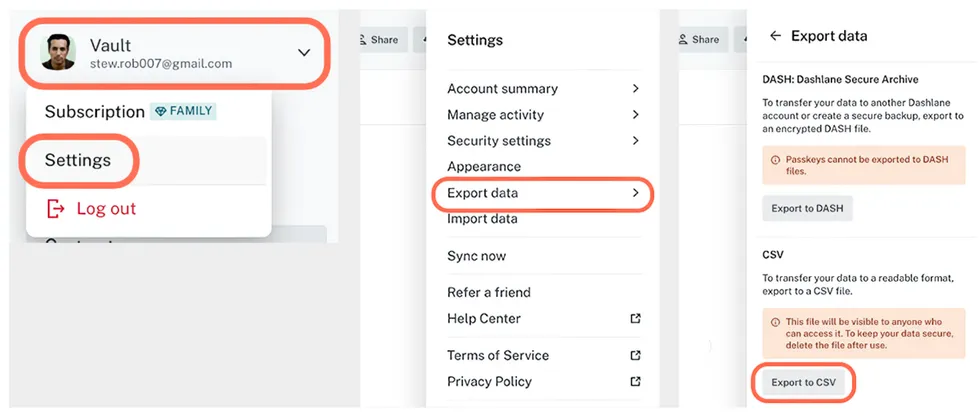
To export your Dashlane passwords, go to Dashlane on the web, open your Vault menu, and select “Settings.” Several lines down, click on “Export data,” followed by “Export to CSV.”
 Screenshots by Zach Laidlaw/Dashlane
Once you export your passwords, don’t forget to delete your Dashlane account; otherwise your login information is still accessible on its servers.
WARNING: Before you do anything, open the CSV file and confirm that your passwords are all present and accounted for. Once you delete your Dashlane account, this file is the only record of your passwords.
 Screenshot by Zach Laidlaw/Dashlane
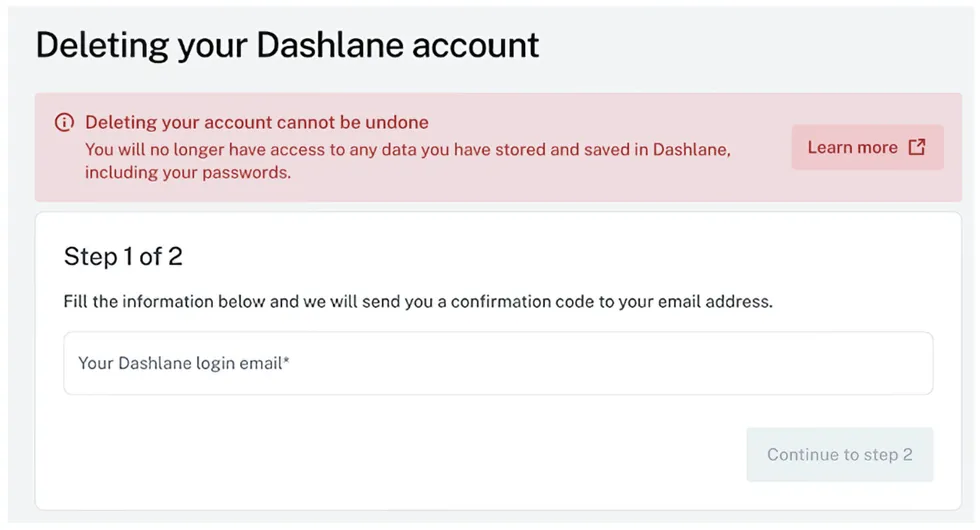
To delete your Dashlane vault, navigate to the account deletion page on your computer, enter the email address attached to your Dashlane account, and follow the steps to confirm.
Now that you have your CSV file and your Dashlane account is gone, you’ll need to save your file in a password-protected location or upload it to an alternative password manager. A few good candidates include Proton Pass, 1Password, NordPass, and LastPass. Whichever one you pick is up to you (I recommend Proton Pass for privacy or 1Password for superb security), but whatever you do, do not store them in an unprotected text file on your computer. That’s probably worse than just keeping them in Dashlane in the first place.