
gorodenkoff/Getty Images
Facebook’s algorithm is designed to serve you content that you’re more likely to watch and engage with. Unfortunately, sometimes the algorithm is plain wrong, and you could get stuck with a feed full of garbage. Fortunately, you can learn how to tame the algorithm by tailoring your interests so that you see more of what you like and less of what you don’t.
According to Facebook, the algorithm checks for four points when you open the app: content posted by friends and publishers, signals that determine relevant content based on the time of day and your internet connection speed, predictions that try to anticipate which types of content you’ll click or comment on more often, and a final interest score, which ultimately judges whether or not a post is interesting enough to share to you.
Your feed should be more in line with your personal interests now that you’ve provided some parameters.
And yet even after all these checks and balances, Facebook’s algorithm isn’t perfect. Far from it, in fact. Whether it’s political drivel, news stories you don’t want to see, or ads from companies that don’t align with your personal values, there are plenty of reasons why you might want to hit the reset button on your feed.
Unfortunately, no such button exists to wipe out the whole thing. You can, however, tailor your feed to your personal interests in just a few easy steps.
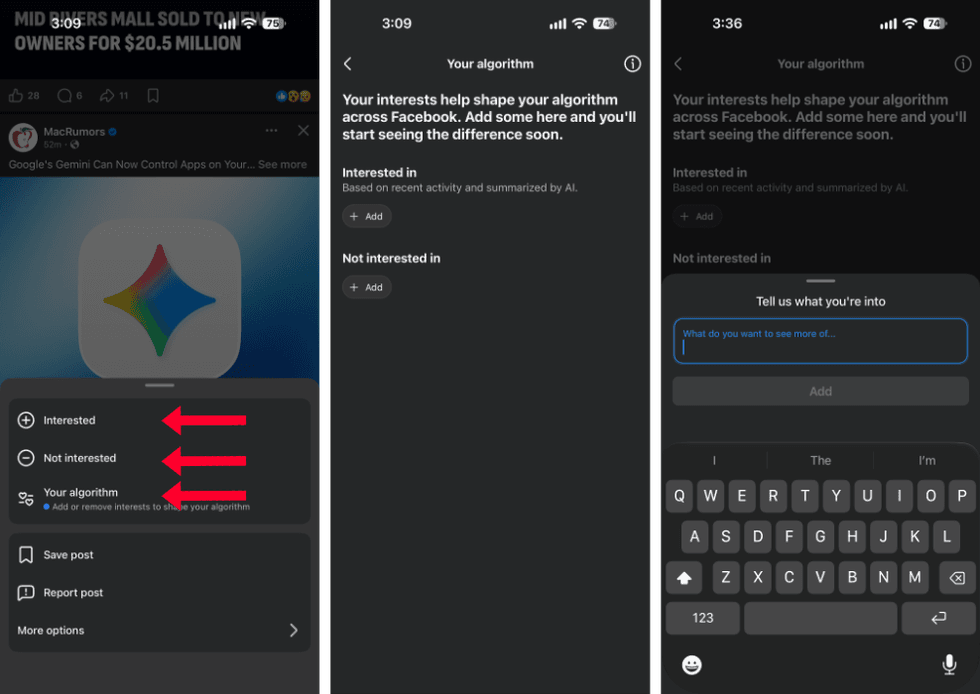
Every post you see on Facebook has a settings panel. You can find it by tapping the three horizontal dots at the top right corner of any post. This will invoke a menu from the bottom of the screen with several distinct options: Interested, not interested, and your algorithm. Below that, you’ll find additional options to save the post, report the post, and more. We’re only working with the top three lines of the menu today, so you can ignore the rest.
 Facebook interests algorithm/Zach Laidlaw
The game is simple: When you see something you particularly like in your feed, tap the three dots on the post, and from the pop-up menu, select “Interested.” This will tell the algorithm to send you more posts with similar content to your feed, whether that’s technology, conservative politics, or warm and fuzzy dog or cat videos.
When you see something you dislike, tap the same three dots on the post and select “Not interested.” This will prevent similar posts from landing in your feed.
While this is a sure-fire way to tell Facebook what you want to see and what you don’t, this method can take time. You could spend days or weeks culling posts to make the perfect feed. If you’d rather give Facebook a head start, you can select that third option on the menu that says “your algorithm.”
On this page, you can either add content to the “interested in” section or the “not interested in” area, simply by tapping “add” and writing what you want to see. If you use Facebook often, you might even find the early makings of a list already nestled under these sections that you can further customize to your liking.
RELATED: Beware: The top AI detector is now shockingly good — even at video
 Mininyx Doodle/Getty Images
Now, once you do all of these things, that’s not to say that your feed will be perfect. Technology is flawed, and it will make mistakes. However, your feed should be more in line with your personal interests now that you’ve provided some parameters.
Before we go, a final caveat: While customizing your interests will tell Facebook which posts you want to see, it will also tell Meta which ads you’re more likely to click and which products you could buy. This may not be a problem for some who don’t mind seeing targeted ads in exchange for free social media, but others may find it intrusive to their personal privacy.
As a result, you should mark your interests at your own discretion. The uber-specific ads may not be worth the refined feed, or perhaps seeing better content is the only thing that matters. You decide.
Like Blaze News? Bypass the censors, sign up for our newsletters, and get stories like this direct to your inbox. Sign up here!