herstockart/Getty Images
For decades, Google dominated the search engine race, beating out competitors like Bing, Yahoo, and many others as the de facto arbiter of information on the internet. However, for reasons only Google execs can understand, the Big Tech giant has since decided to let its search engine fade into obscurity beneath the shadow of AI. Naturally, users aren’t happy, and many of them are flocking to an alternative for a better experience.
Whether you’ve heard of it or not, DuckDuckGo has been around since 2008. It bills itself as a privacy-focused search engine that does exactly the opposite of Google — it won’t monetize your queries, spy on your browsing history, or inject political bias into its algorithm. It simply delivers search results, and that’s it.
The sudden surge is a clear rejection of Google’s new AI-first strategy.
Shortly after Google’s announcement to push AI interactions over classic Search, users looked to DuckDuckGo as their saving grace. According to DuckDuckGo on X, installs of its app jumped up 30% in the United States.
Why? After all, DuckDuckGo offers an AI search mode, just like Google. How is it any better? The difference is that DuckDuckGo lets users actively remove AI from their queries, while Google puts AI front and center.
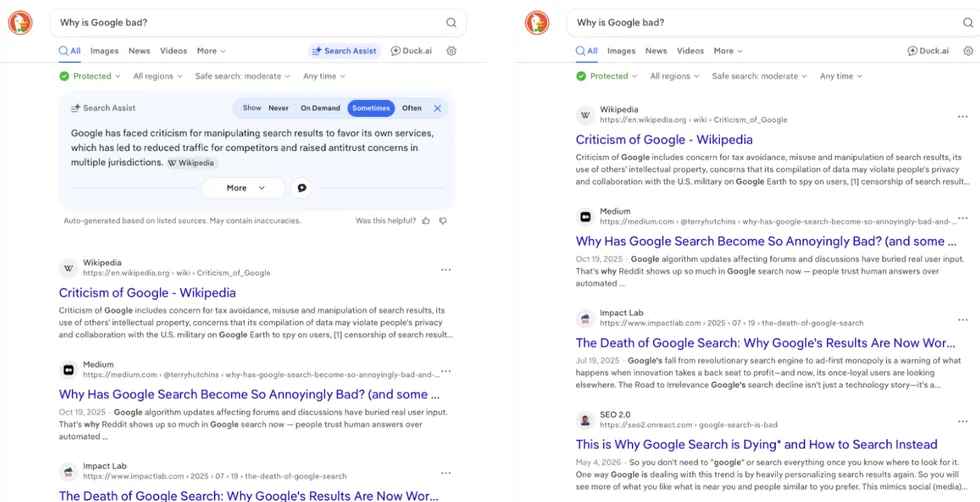 DuckDuckGo with AI (L); DuckDuckGo without AI (R). Screenshots by Zach Laidlaw
The sudden surge is a clear rejection of Google’s new AI-first strategy, though it hasn’t stopped the company from moving forward. In the grand scheme of things, a 30% jump for a competitor that only boasts 2% of the search engine market is quite small compared to Google’s dominating 90%. Still, after Microsoft spent hundreds of billions of dollars to lure Google customers over to Bing, it’s interesting to see DuckDuckGo have its moment simply because Google neglected its search engine roots.
If you want to change the default search engine on your phone, it’s pretty easy, though the steps are a little different depending on your operating system and default browser. If you do try it out and decide you don’t like it, you can always switch back using this guide in reverse.
RELATED: Sick of Microsoft's preinstalled propaganda on your PC? Block it now.
 DigitalVision/Getty Images
Safari on iPhone: Open the Settings app, scroll to the bottom, tap “Apps,” then select “Safari” from the list. Beneath the “Search” section, choose “Search Engine,” and change the default from Google to DuckDuckGo.
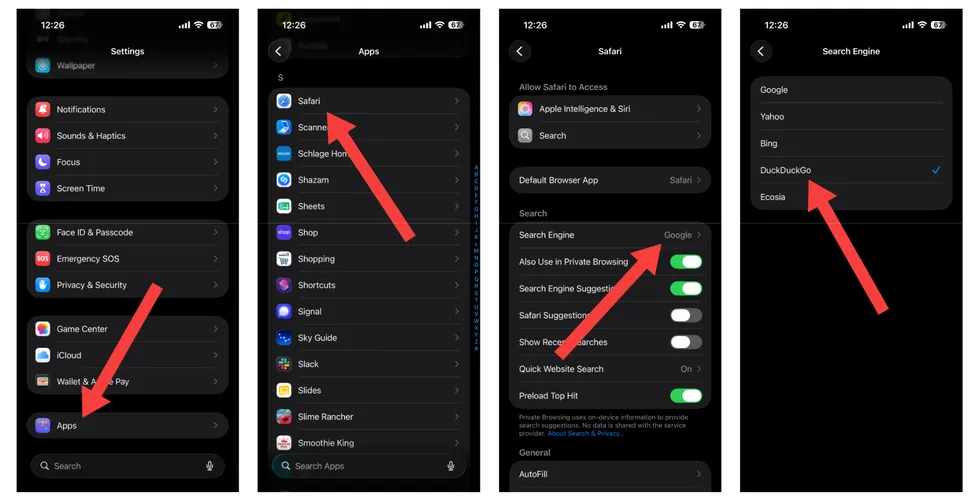 Screenshots by Zach Laidlaw/Safari on iPhone
Chrome on Android: Open the Chrome app, tap the three-dot menu in the top right corner, and choose “Settings.” Beneath the “Basics” section, tap “Search Engine” and change the default option from Google to DuckDuckGo.
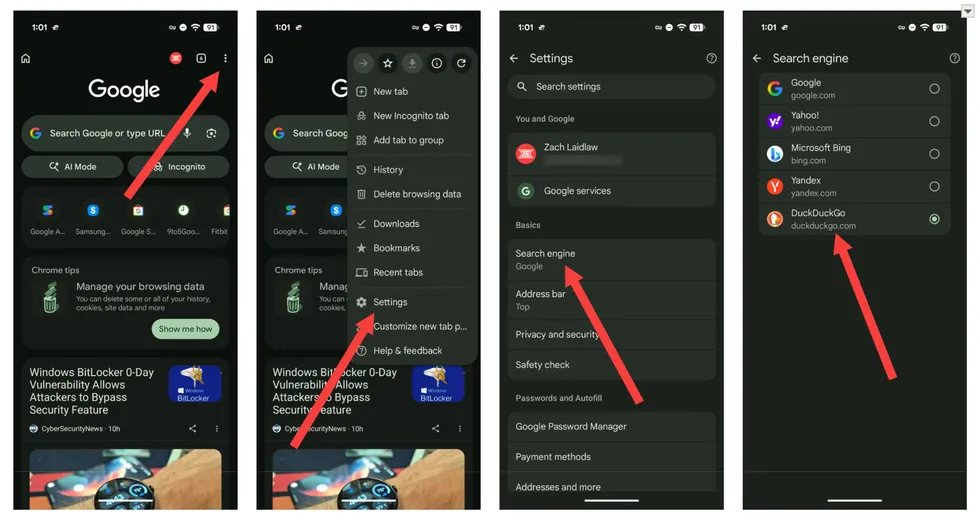 Screenshots by Zach Laidlaw/Chrome on Android
Chrome on iPhone: Open the Chrome app, tap the three-dot menu in the bottom right corner, and open “Settings.” Then tap “Search Engine,” change it from Google to DuckDuckGo, and you’re done!
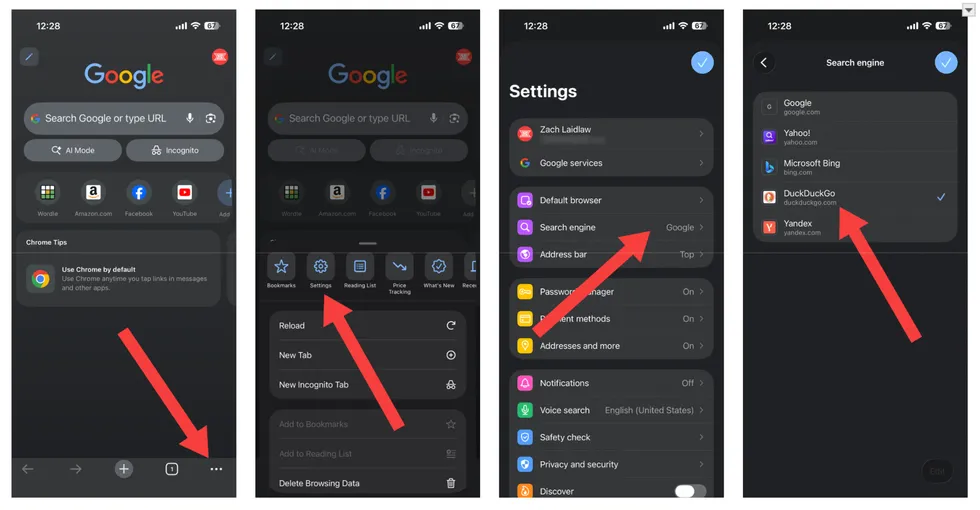 Screenshots by Zach Laidlaw/Chrome on iPhone
Edge on Android: Open the Microsoft Edge app, tap the hamburger menu in the bottom right corner, and go into “Settings.” Then tap “Search” and change the search engine from Bing to DuckDuckGo.
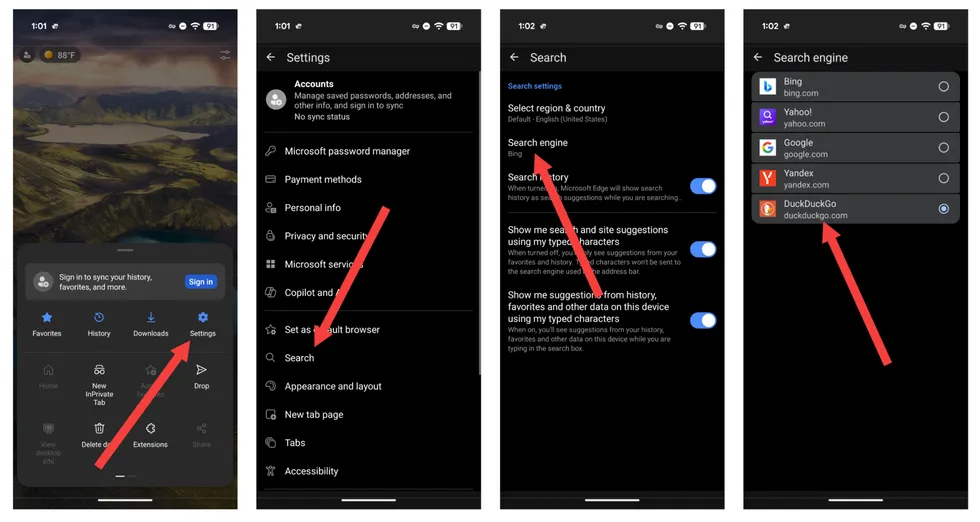 Screenshots by Zach Laidlaw/Edge on Android
Edge on iPhone: Open the Microsoft Edge app, tap the hamburger menu in the bottom right corner, and choose “Settings.” Then select “Search” and change the “Select Search Engine” option from Bing to DuckDuckGo.
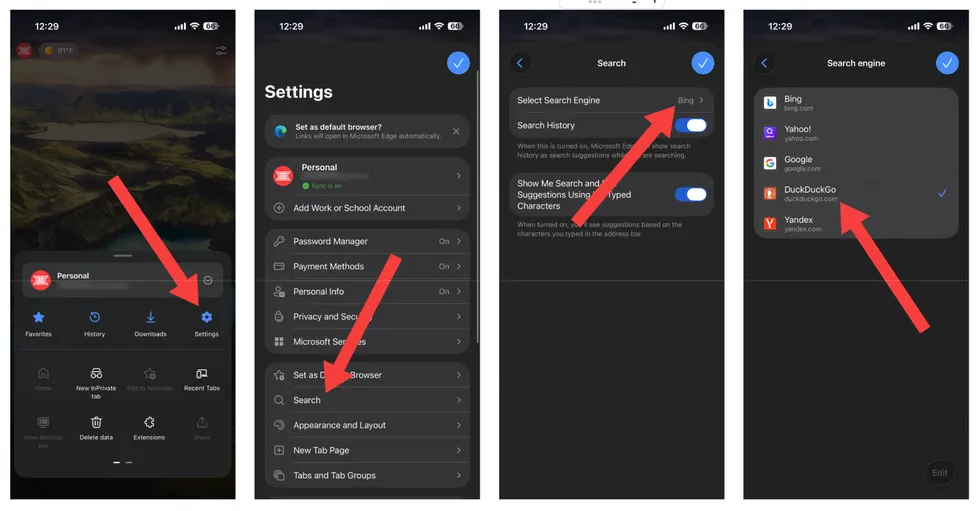 Screenshots by Zach Laidlaw/Edge on iPhone
Brave on Android: Open the Brave app, tap the three-dot menu in the bottom right corner, and open “Settings.” Under the “General” section, select “Search Engines” and change the Standard Tab and Private Tab to DuckDuckGo.
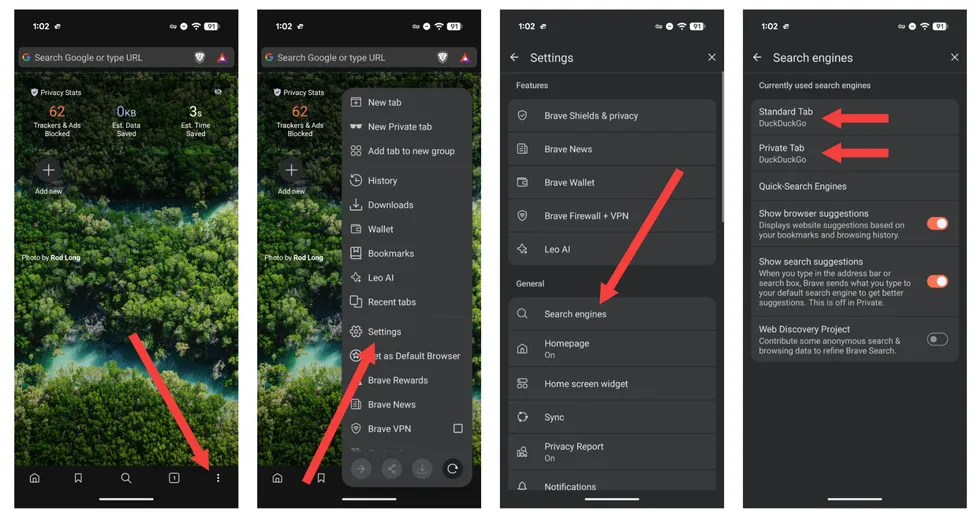 Screenshots by Zach Laidlaw/Brave on Android
Brave on iPhone: Open the Brave app, tap the three-dot menu in the bottom right corner, and choose “All Settings.” Under the “General” section, tap “Search Engines” and change the Standard Tab and Private Tab to DuckDuckGo.
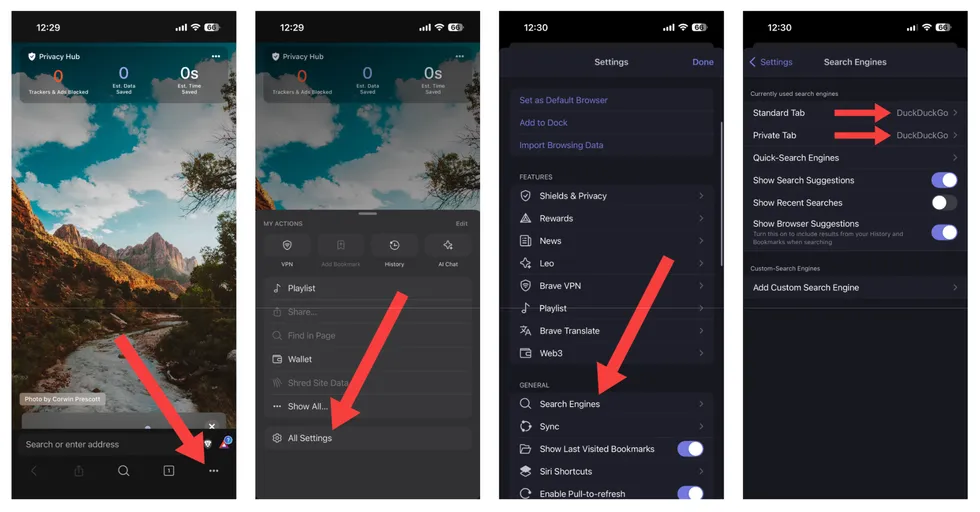 Screenshots by Zach Laidlaw/Brave on iPhone
Firefox on Android: Open the Firefox app, select the three-dot menu in the top right corner, followed by “Settings.” Under “General,” tap “Search,” then “Default search engine,” and switch it to DuckDuckGo for normal and private browsing.
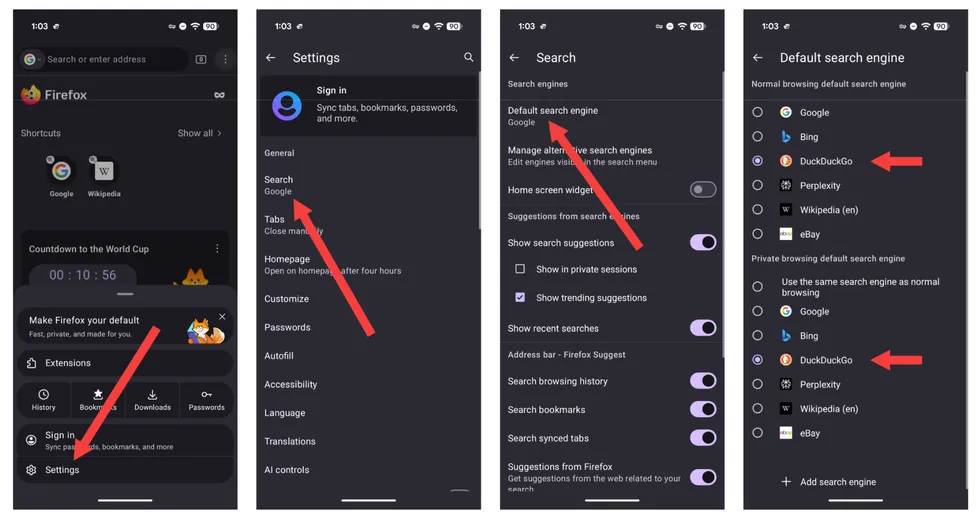 Screenshots by Zach Laidlaw/Firefox on Android
And finally, Firefox on iPhone: Open the Firefox app, select the three-dot menu at the bottom, and tap “Settings.” Under “General,” choose “Search,” then “Default Search Engine,” and change it to DuckDuckGo.
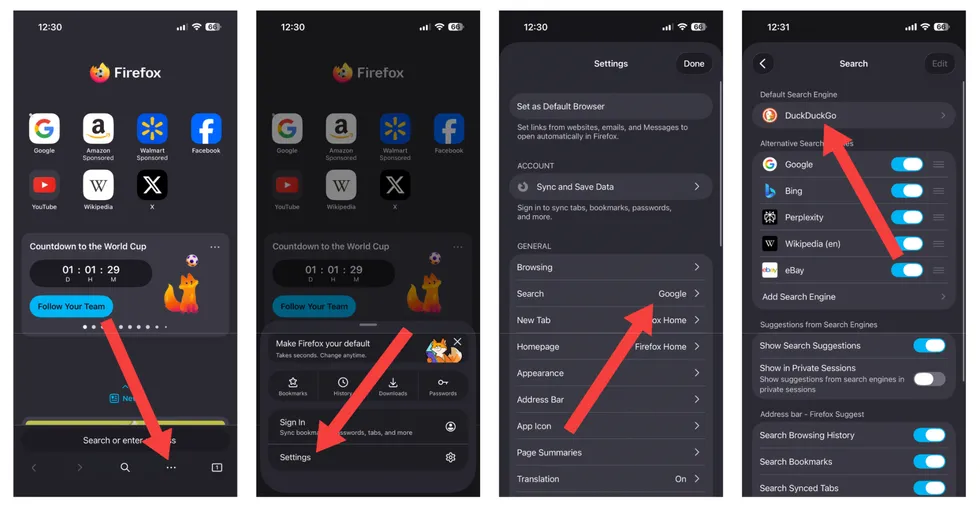 Screenshots by Zach Laidlaw/Firefox on iPhone
Happy Duck hunting!